Thursday, April 8, 2010

Glassfish plugin for Eclipse

Glassfish has come as an plugin for Eclipse - bringing with it a lot of ease enjoyed by NetBeans IDE users

Steps:
1. In Eclipse, menu ->   -> drop-drop,
    a. Check if software site "https://ajax.dev.java.net/eclipse" exists?
        If not, add it thru preferences link (below it).
    b. it would show as below:


 2. Select 'Glassfish JEE5, Java' and click 'next'
 3. Accept the 'Terms & conditions'
 4. In Progress:


5. Now, In servers tab -> , we can find the Glassfish servers as below:


 Also, in context menu, as below:


Misc Reference:
Creating JAX-WS using Metro plugin for Eclipse 

Tuesday, April 6, 2010

Web project - folder structure

 
Figure 2.1: Web Applications: Recommended Directory Structure

Web Deployment Descriptor
web.xml file
JavaSource (or src/java)
Contains the project's Java source code for classes, beans, and servlets. When these resources are added to a Web project, they are automatically compiled and the generated files are added to the WEB-INF/classes directory. The contents of the source directory are not packaged in WAR files unless an option is specified when a WAR file is created.
imported_classes folder
This folder may be created during a WAR import, and contains class files that do not have accompanying source. The imported_classes folder is a Java classes folder; Java classes folders can also be created using the Web project Java Build Path properties page.
WebContent (or web) folder
The mandatory location of all Web resources, including HTML, JSP, graphic files, and so on. If the files are not placed in this directory (or in a subdirectory structure under this directory), the files will not be available when the application is executed on a server. The Web content folder represents the contents of the WAR file that will be deployed to the server. Any files not under the Web content folder are considered development-time resources (for example, .java files, .sql files, and .mif files), and are not deployed when the project is unit tested or published.
META-INF
This directory contains the MANIFEST.MF file, which is used to map class paths for dependent JAR files that exist in other projects in the same Enterprise Application project. An entry in this file will update the run-time project class path and Java build settings to include the referenced JAR files.
theme
The suggested directory for cascading style sheets (css) and other style-related objects.
WEB-INF
Based on the Sun Microsystems Java Servlet 2.3 Specification, this directory contains the supporting Web resources for a Web application, including the web.xml file and the classes and lib directories.
/classes
This directory is for servlets, utility classes, and the Java compiler output directory. The classes in this directory are used by the application class loader to load the classes. Folders in this directory will map package and class names, as in: /WEB-INF/classes/com/mycorp/servlets/MyServlet.class.This is generated while a build happens. Do not place any .class files directly into this directory. The .class files are placed in this directory automatically when the Java compiler compiles Java source files that are in the Java Resources directory. Any files placed directly in this directory will be deleted by the Java compiler when it runs.
/lib
The supporting JAR files that your Web application references. Any classes in .jar files placed in this directory will be available for your Web application. In short, jar's file would be in classpath.
Libraries
The supporting JAR files that your Web application references. This folder mirrors the content of the lib folder. In addition, Web Library Projects, which are "virtual" JAR files that do not physically reside in the Web project, but are associated with Java projects elsewhere in your workspace, are included in this folder. They are packaged with your project when you export the application's WAR file.
 A library entry on the Java build path will remain there unless the actual JAR file is deleted from the WEB-INF/lib folder. If you remove a library path entry but not the JAR file, the library entry will be re-added to the path automatically.

[Ultimate Reference: http://java.sun.com/blueprints/code/projectconventions.html ]

Thursday, April 1, 2010

Quartz - driving the enterprise 'chronometer'

 A job scheduler is a system that is responsible for executing (or notifying) other software components when a pre-determined (scheduled) time arrives.

Quartz is a full-featured, open source job scheduling system that can be integrated with, or used along side virtually any J2EE or J2SE application - from the smallest stand-alone application to the largest e-commerce system. Quartz can be used to create simple or complex schedules for executing tens, hundreds, or even tens-of-thousands of jobs; jobs whose tasks are defined as standard Java components or EJBs. The Quartz Scheduler includes many enterprise-class features, such as JTA transactions and clustering.

 What Can Quartz Do For You?

If your application has tasks that need to occur at given moments in time, or if your system has recurring maintenance jobs then Quartz may be your ideal solution.
Sample uses of job scheduling with Quartz:
  • Driving Process Workflow: As a new order is initially placed, schedule a Job to fire in exactly 2 hours, that will check the status of that order, and trigger a warning notification if an order confirmation message has not yet been received for the order, as well as changing the order's status to 'awaiting intervention'.
  • System Maintenance: Schedule a job to dump the contents of a database into an XML file every business day (all weekdays except holidays) at 11:30 PM.
  • Providing reminder services within an application.

Quartz is distributed as a small java library (.jar file) that contains all of the core Quartz functionality. The main interface (API) to this functionality is the Scheduler interface. It provides simple operations such as scheduling/unscheduling jobs, starting/stopping/pausing the scheduler.

Quartz vs. java.util.Timer
  1. Timers have no persistence mechanism.
  2. Timers have inflexible scheduling (only able to set start-time & repeat interval, nothing based on dates, time of day, etc.)
  3. Timers don't utilize a thread-pool (one thread per timer)
  4. Timers have no real management schemes - you'd have to write your own mechanism for being able to remember, organize and retreive your tasks by name, etc.
Runtime environment
  • Quartz can run embedded within another free standing application
  • Quartz can be instantiated within an application server (or servlet container), and participate in XA transactions
  • Quartz can run as a stand-alone program (within its own Java Virtual Machine), to be used via RMI
  • Quartz can be instantiated as a cluster of stand-alone programs (with load-balance and fail-over capabilities)
Job Execution
  • Jobs can be any Java class that implements the simple Job interface, leaving infinite possibilities for the work your Jobs can perform.
  • Job class instances can be instantiated by Quartz, or by your application's framework.
  • When a Trigger occurs, the scheduler notifies zero or more Java objects implementing the JobListener and TriggerListener interfaces (listeners can be simple Java objects, or EJBs, or JMS publishers, etc.). These listeners are also notified after the Job has executed.
  • As Jobs are completed, they return a JobCompletionCode which informs the scheduler of success or failure. The JobCompletionCode can also instruct the scheduler of any actions it should take based on the success/fail code - such as immediate re-execution of the Job.
Job Persistence
  • The design of Quartz includes a JobStore interface that can be implemented to provide various mechanisms for the storage of jobs.
  • With the use of the included JDBCJobStore, all Jobs and Triggers configured as "non-volatile" are stored in a relational database via JDBC.
  • With the use of the included RAMJobStore, all Jobs and Triggers are stored in RAM and therefore do not persist between program executions - but this has the advantage of not requiring an external database.
 [ For more on features refer: http://www.quartz-scheduler.org/overview/features.html]

Few factors affecting Performance
  • RAM-based JobStore is MUCH (1000x) faster than the JDBC-based JobStore.
  • Limiting factor of the number of Triggers and Jobs Quartz can "store" and monitor is really the amount of storage space available to the JobStore (either the amount of RAM or the amount of disk space)
  • Actual number of jobs that can be running at any moment in time is limitted by the size of the thread pool

Types of Triggers
  • SimpleTrigger ALWAYS fires exacly every N seconds, with no relation to the time of day.
  • CronTrigger ALWAYS fires at a given time of day and then computes its next time to fire. If that time does not occur on a given day, the trigger will be skipped. If the time occurs twice in a given day, it only fires once, because after firing on that time the first time, it computes the next time of day to fire on.
Scheduling using Quartz
Quartz Implementation with Spring

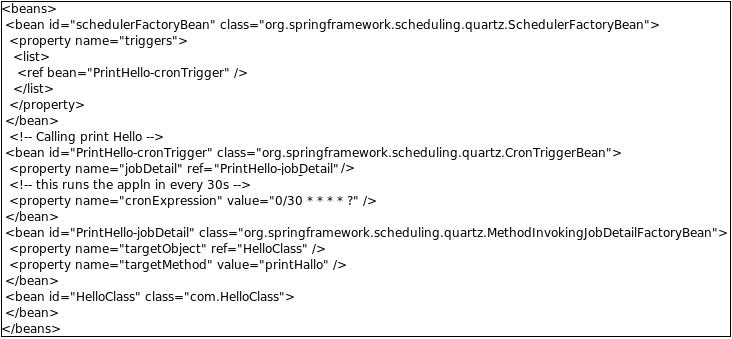
The Quartz, as we saw above, would be used for 'timing' enterprise activities. This means it would call certain method(s) at certain interval (or certain point of time in a day, month or so). This methods of the particular class & Quartz in general can be wired using Spring IoC.

Example application context xml here under:

HelloClass would be a java class with a method printHallo() (containing System.out.println("Hello mate!"); ).
Misc:

      Wednesday, March 31, 2010

      OAuth-ing Twitter thru Twitter4J API

      Further to my blog topic - "OAuth - 'valet' key to online info lockers" couple of days back, I found a blog which 'OAuth's to Twitter to generate access token using Twitter4J API at:
      OAuth-ing Twitter thru Twitter4J API

      Oracle - SID vs Service Name

      Oracle SIDs vs Oracle Service Name?


      SID = unique name of the instance/database (eg the oracle process running on the machine). Oracle considers the "Database" to the be files.
      ServiceName = alias used when connecting. The main purpose of this is if you are running a cluster, the client can say "connect me to SALES.acme.com", the DBA can on the fly change the number of instances which are available to SALES.acme.com requests, or even move SALES.acme.com to a completely different database without the client needing to change any settings.

      Service name is recorded in Tnsnames.ora file on the clients and it can be the same as SID and you can also give it any other name you want. ORACLE_SID is recorded in instance_name; this could be the same as the database name (init.ora for db_name parameter). oratab file gives the list of instances in the server.

      SERVICE_NAME is the new feature from oracle 8i onwards in which database can register itself with listener. If database is registered with listener in this way then use SERVICE_NAME parameter in tnsnames.ora; otherwise - use SID in tnsnames.ora.

      In Oracle Parallel Server (RAC), there would be different SERVICE_NAME for each instance.

      SERVICE_NAMES specifies one or more names for the database service to which this instance connects. You can specify multiple services names in order to distinguish among different uses of the same database. For example:
      SERVICE_NAMES = sales.foo.com, phonesales.foo.com

      Service names also identify a single service that is available from two different databases through the use of replication. In an Oracle Parallel Server environment, parameter has to be used for every instance.

      You might have have a staging database and a production database with the same SID but referenced with 2 different service names:


      STAGE.WORLD =
       (DESCRIPTION =
         (ADDRESS =
            (PROTOCOL = TCP) 
            (PORT = 1521)
            (HOST = LITTLECOMPUTER.ACME.ORG)
         )
         (CONNECT_DATA = (SID = MYSID))
      )
      PROD.WORLD =
       (DESCRIPTION =
         (ADDRESS =
            (PROTOCOL = TCP) 
            (PORT = 1521)
            (HOST = BIGCOMPUTER.ACME.ORG)
         )
         (CONNECT_DATA = (SID = MYSID))


      [Refer: http://www.sap-img.com/oracle-database/finding-oracle-sid-of-a-database.htm]

      Creating DataSource in Tomcat

      Unlike Weblogic AppServer, the tomcat don't provide way to add the datasource via the admin console.
      For managing the datasource, we need to edit the settings.xml; follow the link:
      Datasource in Tomcat
      [This done by editing context.xml in the apache~/conf]

      Monday, March 29, 2010

      Installing 'not found' jars to local maven repo

      At times, some of the jar files won't be found or inconsistent version (with vendor's) of the jar might be found in maven central repo at: http://repo1.maven.org/maven2. So, we need to go and deploy into our local repo.
      Below are 2 ways of doing it.


      1. If no source of jar available:-
             mvn install:install-file -DgroupId=com.oracle -DartifactId=ojdbc14 -Dversion=10.1.0.2.0 -Dpackaging=jar -Dfile=path/to/file


      2. If jar available in repo other than repo1.maven... :-


      With respect to Sun related jars, Refer: Coping with sun-jars